Meet the people and teams behind successful drawing workflows
Interactive CAD projects succeed when the drawing, the data, and the people using them are planned together. The examples on this page describe common customer situations without exposing private project information. They show how a hotspot workflow can help teams make a visual document easier to search, explain, and maintain.
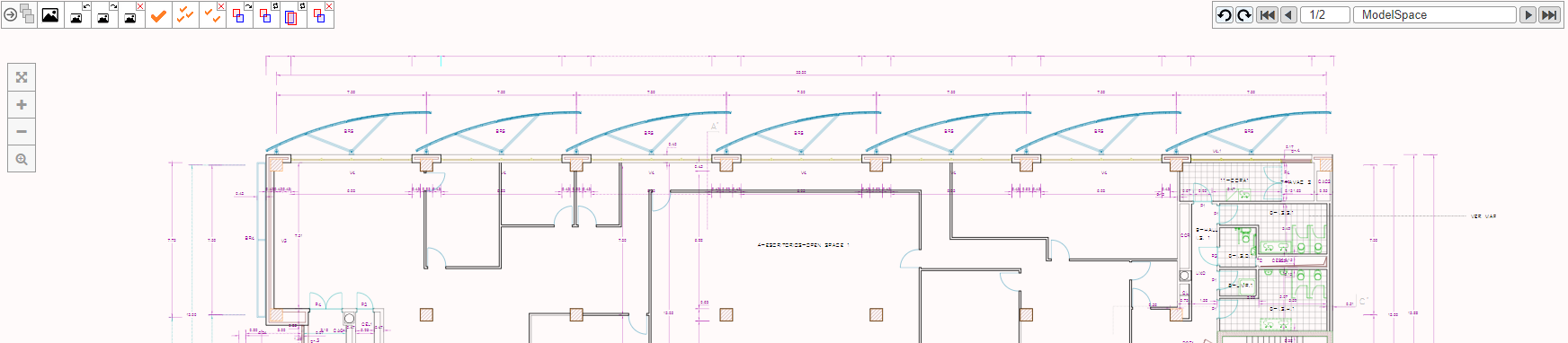
Facilities teams: finding rooms and assets faster
A facilities team often receives requests that begin with a location: a room, floor, wing, or equipment area. Searching through separate spreadsheets and drawing files takes time and encourages inconsistent descriptions. An interactive floor plan can give the team one visual starting point. Selecting a room can show its identifier, function, responsible group, current status, and links to related records.
The strongest implementations begin with a small set of high-value tasks. Instead of making every symbol clickable, the team chooses rooms and assets that generate the most questions. It defines a naming rule, agrees on the information shown in a detail panel, and tests the result with people who respond to daily requests. The result is easier to learn and easier to maintain than a drawing covered with unstructured links.
Property teams: explaining parcels and site information
Property and planning teams work with site plans that contain boundaries, access points, structures, easements, and notes. A static export is useful for printing, but a browser view can help a reader understand the relationship between a parcel and the information attached to it. A hotspot can open a short explanation, a document reference, or a next step for an enquiry.
Clear scale and restrained styling are important. A visitor should be able to distinguish the main parcel from background context. Labels should support the image rather than cover it. Teams can also provide a text list of parcels so that users who do not interpret linework easily still have a reliable path to the same information.
Operations teams: turning maps into wayfinding tools
Campuses, connected buildings, and skyway systems require more than a collection of floor plans. People need to understand where they are, where a route begins, which building is connected, and what to expect along the way. A map with selected route segments can explain this relationship more quickly than a long written description.
Good wayfinding projects use a small visual vocabulary. The current location, destination, accessible route, entrance, and service point each have a distinct treatment. The interface should explain the legend, offer a reset action, and keep the selected route visible while supporting information is read. Testing with first-time visitors reveals confusing turns that a project team may overlook.
Document teams: connecting drawings with evidence
Engineering and document teams often know which drawing contains the answer but still spend time locating the right sheet or area. A hotspot interface can connect visible objects to specifications, inspection notes, revision records, or approved documents. The drawing remains the visual index while the document system remains the source of record.
Ownership must be explicit. Decide who approves a link, who retires an outdated document, and how the interface indicates a superseded revision. Keep identifiers stable and show a document date or revision where it affects the user?s decision. This prevents a polished drawing from becoming a hidden route to obsolete evidence.
What successful projects share
Across these situations, successful teams share several habits. They choose one clear audience, start with a small set of tasks, prepare the drawing deliberately, and use identifiers that can be checked. They test with real users before adding advanced features. They also treat content as part of the project rather than as text added at the end.
They measure practical results: fewer repeated questions, shorter time to locate a room or asset, clearer handover, fewer incorrect links, or faster review of a site plan. These measures help the team decide whether the hotspot workflow is solving a real problem and where the next improvement should be made.
Start with a focused pilot
A focused pilot can use one drawing, five to ten hotspot types, and a small set of representative users. Document the source file, conversion rules, content fields, and acceptance checks. Once the pilot works, add drawings in groups that share the same rules. This keeps quality consistent and makes training easier.
For help planning a project, visit the local Support page, read the News articles, or use Contact Us to describe your requirements.
Measuring value after launch
A customer story becomes useful when it describes the change in work, not only the technology used to create it. Before launch, record a simple baseline: how long it takes to answer a location question, how many people are involved, how often an outdated drawing is used, or how many requests are redirected to the wrong team. After launch, repeat the measurement with the same type of task. The result does not need to be complicated. A shorter search time, fewer repeated emails, or clearer responsibility can show that the visual workflow is helping.
Qualitative feedback matters as well. Ask users what they expected to happen, where they hesitated, and which labels were unclear. A visitor may understand the drawing but not recognise that a highlighted area is clickable. A technician may prefer a compact identifier while a manager needs a plain language description. Keep a record of those observations and use them to refine labels, grouping, legends, and detail panels.
Security and information boundaries
Customer projects often connect a public drawing with information that should remain restricted. Separate public geometry from private records and enforce access rules in the application or data service. A hotspot should never be treated as a security boundary by itself. If a user is allowed to see a room outline but not its maintenance history, the system must check permission before returning the history.
Review every link and document exposed by a drawing. Remove temporary test files, private email addresses, credentials, and internal server paths before publication. Use sample records in demonstrations and make it clear which content is illustrative. This discipline protects the customer and makes a later migration to a production system less risky.
Working with different teams
Interactive drawing projects cross several responsibilities. CAD specialists understand layers, blocks, units, and drawing accuracy. Developers understand paths, data services, performance, and deployment. Content owners understand names, status values, and the language users recognise. Project managers connect those perspectives and decide which result is important enough to release.
A short review workshop can prevent expensive rework. Walk through the source drawing, identify the five most important user questions, sketch the selected state, and agree on the first content fields. Then assign one owner to each decision. When the first prototype is ready, invite representatives from each group to test the same tasks and resolve differences before adding more coverage.
From a demonstration to a dependable service
A demonstration proves that a drawing can be displayed and selected. A dependable service adds versioning, monitoring, backups, accessibility checks, content ownership, and a release process. It also defines what happens when a drawing is replaced, a room is renamed, or an external document is retired.
Customers get the best long-term result when the project starts small but is designed with these future questions in mind. Use predictable folders, stable identifiers, documented conversion settings, and a clear sitemap. Keep a representative test drawing so a library or server change can be checked quickly. This turns a successful idea into a capability that can support new buildings, sites, and teams without starting over.
Recommendations for choosing the first customer scenario
Choose a scenario where the location is important, the source drawing is available, and the responsible team can meet regularly during the pilot. A single floor, a small site, or one route is usually easier to learn from than an entire estate. Select an outcome that can be observed, such as finding a room, identifying an asset, or opening the correct document. Avoid starting with a requirement that depends on many unverified systems.
Make the first release honest about its boundaries. Explain the drawing date, the information included, and the action a user should take when a record is missing. People trust a visual tool more when it communicates uncertainty clearly. After the pilot, use the feedback to decide whether to expand the drawing, connect another data source, add search, or improve the mobile experience.
Keep the pilot review practical: give users a short task, observe without coaching, and record the words they use when describing a problem. Those words often reveal better menu labels and search terms than a design meeting can produce. A customer page should celebrate results while also showing the decisions and care that made the result reliable.
That evidence also gives future contributors a clear starting point. They can see which objects matter, which fields users trust, and which checks must happen before a new drawing is published. This turns a customer example into a repeatable lesson for the next project.